
Last updated: 2023-01-14
Introduction
FLIP BITS is a card game that uses binary digits and binary operations. The goal of the game is to change the MEMORY BITS to match the GOAL BITS. To do so you will have to use the OPERATION cards and HEX card in your hand.
Recommended number of players: 2 to 5.
Check the single player mode section for a solo version of the game.
Components
BITS
A BIT can have 2 possible values: 0 or 1. Flip the BIT card to change its value. The 4 green BIT cards represent the GOAL BITS. The 4 blue BIT cards represent the MEMORY BITS.




HEX cards
16 HEX cards that represent a value in hexadecimal. Hexadecimal values go from 0 to F. Each value has its binary representation that goes from 0000 to 1111. Use them to load the GOAL BITS and MEMORY BITS. Use them in combination with OPERATION cards.




OPERATION cards
30 OPERATION cards that change the value of the MEMORY BITS. Some of them need a HEX card to be applied.

See the operations section for each operation’s details.
Setup
Shuffle HEX cards and make a pile face down. This will be the HEX deck. Next to it there will be another pile face up. Put any discarded HEX card there.
Shuffle OPERATION cards and make another pile face down. This will be the OPERATION deck. Next to it there will be another pile face up. Put any discarded OPERATION card there.
Draw a HEX card. Copy the value using the green BITS. These 4 cards will be the GOAL BITS. Discard this HEX card.
Draw another hex card. Copy the value using blue BITS. These 4 cards will be the MEMORY BITS. Discard this HEX card.
Every player draws 3 OPERATION cards and 1 HEX card. Each player shows his HEX card. The player with the lower value will take the first turn (0 being the lowest value and F being the highest). Play the game clockwise.
How to play
Game is divided in 2 main phases: your turn and someone else’s turn.
On your turn
During your turn you can’t solve the goal. Instead you get the chance to renew your hand.
Discard cards
First you decide which cards from your hand you want to discard, and you do so. You must discard at least one OPERATION card.
Draw cards
Draw OPERATION cards until you have 3. Draw a HEX card if you have none. If you can’t draw a card because the deck is empty, shuffle the discarded cards to renew the deck. Your turn finishes once you draw all cards.
On someone else’s turn
Use other players’ turns to solve the GOAL. Figure out if your current hand can solve it.
Resolving the goal
Anytime during others’ turns you can say out loud “Resolved”. If you do so, pause the game and try to solve the goal. If a player has already discarded cards, wait until the current turn finishes.
Follow these steps to solve the goal:
- Choose which OPERATION cards of your hand you will use.
- Decide the order of these OPERATION cards.
- Apply the OPERATION cards to update MEMORY BITS.
You can use each OPERATION card only once. You can use your HEX card more than once.
Once you finish the MEMORY BITS must match the GOAL BITS.
Failure
If you fail, you get a warning, and every 2 warnings you lose a point. You can have negative points. The game continues, as if nothing has happened. Revert any changes you have made to MEMORY BITS. You maintain your cards.
Success
If you succeed, discard all the cards you have used . MEMORY BITS will keep the last updated value. Draw a HEX card to load new GOAL BITS. Discard this card afterwards.
The game continues but the current turn jumps to you. Only this time you could have fewer (even zero) cards in your hand.
Winning the game
The first player to score 3 points wins the game.
Single player mode
You can play FLIP BITS by yourself.
Your goal is to score 3 points in the least amount of turns. Before starting a turn you can try to solve the goal. You don’t lose points for failing.
Operations
OR
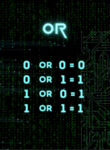
OR is a binary operation between 2 values: MEMORY BITS and the HEX card value.
Put the HEX card behind the MEMORY BITS. Calculate the result of each BIT in each position.
- If both values are 0, the result is 0.
- If one of the values is 1, the result is 1.
- If both values are 1, the result is 1.
Update MEMORY BITS with the result.
Example:
MEMORY BITS: 0101
HEX card:    0011
Result:      0111
AND
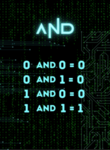
AND is a binary operation between 2 values: MEMORY BITS and the HEX card value.
Put the HEX card behind the MEMORY BITS. Calculate the result of each BIT in each position.
- If both values are 1, the result is 1.
- If one of the values is 0, the result is 0.
- If both values are 0, the result is 0.
Update MEMORY BITS with the result.
Example:
MEMORY BITS: 0101
HEX card:    0011
Result:      0001
XOR
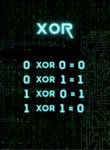
XOR is a binary operation between 2 values: MEMORY BITS and the HEX card value.
Put the HEX card behind the MEMORY BITS. Calculate the result of each BIT in each position.
- If both values are equal, the result is 0.
- If both values are different, the result is 1.
Update MEMORY BITS with the result.
Example:
MEMORY BITS: 0101
HEX card:    0011
Result:      0110
NOT
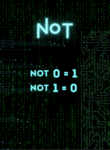
Flip all the MEMORY BITS.
ROTATE LEFT
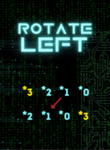
The BIT in the leftmost position of the MEMORY BITS becomes the BIT in the rightmost position. Then all the other MEMORY BITs move one position to the left.
ROTATE RIGHT
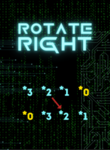
The BIT in the rightmost position of the MEMORY BITS becomes the BIT in the leftmost position. Then all the other MEMORY BITs move one position to the right.
COPY
Copy the value of the HEX card to the MEMORY BITS.
FLIP BIT
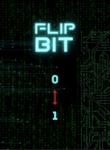
Choose one BIT from the MEMORY BITS and flip it.
MASK OR
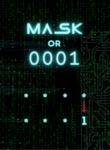
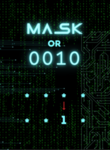
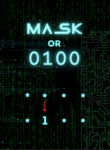

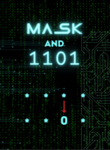
MASK OR operation is the same as OR, but MASK value is used instead of the HEX card value.
MASK BITS possible values are 0001, 0010, 0100 and 1000.
These values affect a single BIT of the MEMORY BITS.
Set this BIT to 1.
MASK AND
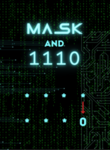
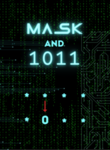
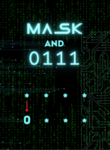
MASK AND operation is the same as AND, but MASK value is used instead of the HEX card value.
MASK BITS possible values are 1110, 1101, 1011 and 0111.
These values affect a single BIT of the MEMORY BITS.
Set this BIT to 0.
MASK XOR
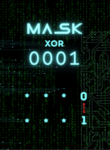
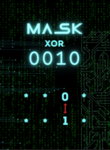


MASK XOR operation is the same as XOR, but MASK value is used instead of the HEX card value.
MASK BITS possible values are 0001, 0010, 0100 and 1000.
These values affect a single BIT of the MEMORY BITS.
Flip this BIT.